

If you are ready to pay an existing policy, you can use Fred Loya’s official online payment form and verify the policy information, amount, and payment details before submitting.
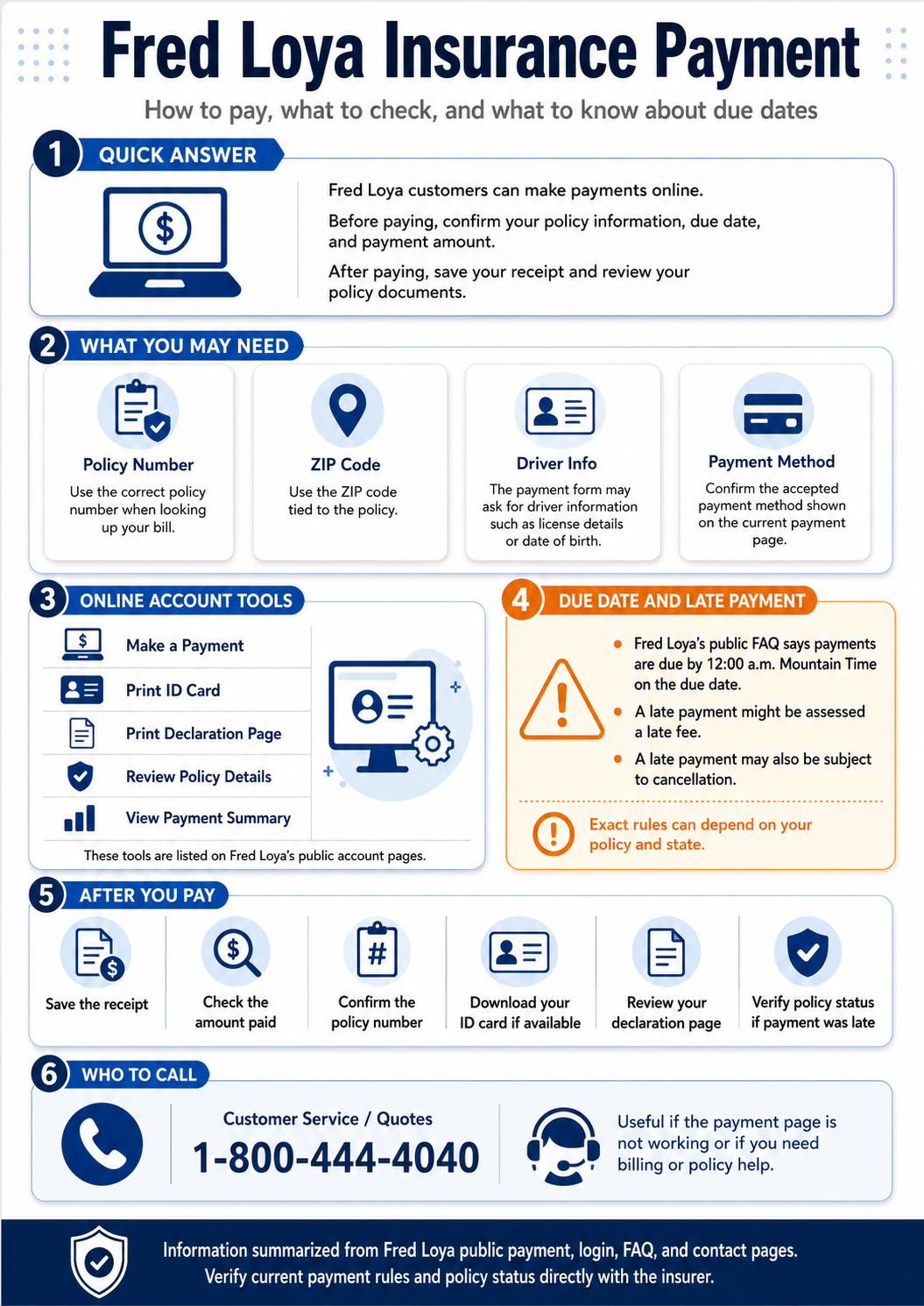
Fred Loya also provides online account tools for payments, insurance ID cards, declaration pages, policy details, and payment summaries. This guide explains what to check before paying, how to document the transaction, and what to do when a payment is late or the policy status is unclear.
Payment deadline: Fred Loya’s current payment page states that payments are due by 12:00 AM MST on the due date, while its FAQ uses 12:00 a.m. MDT. Because the company’s public pages use different Mountain Time abbreviations, avoid relying on the abbreviation alone and pay before the due-date cutoff whenever possible.
How Fred Loya Insurance Payments Work
Fred Loya Insurance provides online payment access for customers paying an existing auto insurance policy. The company’s current payment page uses a three-stage process: bill information, payment information, and review information.
The first stage helps identify the policy before card information is entered. The review stage gives the policyholder another opportunity to check the payment information before submitting the transaction.
That matters because an insurance payment is more than a checkout transaction. Drivers should make sure the payment is associated with the intended policy and keep evidence of the transaction, especially when paying near the due date.
What You May Need Before Making a Payment
Fred Loya’s current public payment page displays fields for information including policy number, ZIP code, driver license number, and date of birth. The fields shown can change, so use the information on your policy documents or billing notice and follow the current payment screen.
Policy Number
The policy number connects the payment to the insurance policy. Check it carefully against your policy documents or billing notice.
ZIP Code
The payment system may use the ZIP code to locate or verify the policy. Use the ZIP code associated with the policy unless the current form says otherwise.
Driver Information
Driver license information or date of birth may be requested to identify the policy. Enter the information exactly as requested on the payment screen.
Payment Method
The current payment page displays credit-card fields. Review the amount and any terms shown before submitting the transaction.
Online Payment, Login, and Policy Tools
Fred Loya’s public login page says customers can manage several policy functions online. The listed tools include making a payment, printing an insurance ID card, printing a declaration page, reviewing policy details, and viewing a payment summary.
| Online Tool | What It Can Help With | What to Check |
|---|---|---|
| Make a Payment | Pay an existing Fred Loya policy through the online payment system. | Check the policy, amount, and payment information before submitting. |
| Print ID Card | Access available proof-of-insurance documents. | Check the insured information, vehicle, and effective dates. |
| Print Declaration Page | Access a document summarizing important policy information. | Review vehicles, drivers, coverage, limits, and other policy details. |
| Review Policy Details | Look over policy information through the customer account. | Verify names, addresses, vehicles, coverage, and billing information. |
| Payment Summary | Review payment information available through the account. | Keep useful records when paying close to the due date or resolving a billing issue. |
Step-by-Step: Making a Fred Loya Payment
Gather the policy information
Have the policy number, ZIP code, relevant driver information, billing notice, and payment method available before beginning.
Check the due date before paying
Fred Loya’s public pages place the payment deadline at midnight Mountain Time on the due date, although the official pages currently use both MST and MDT abbreviations. Paying earlier reduces the risk of a time-zone or processing dispute.
Review the transaction before submitting
Check the policy information, payment amount, card information, and any terms displayed on the current payment screen before clicking the final payment button.
Save the payment confirmation
Fred Loya’s payment page says a receipt is sent to the email address on file after payment and shows options to download a payment receipt, insurance ID card, and declaration page. Save the records that are available to you.
Late Payments, Grace Periods, and Cancellation Risk
Fred Loya’s public FAQ says there is no general grace period in the answer it provides: payment is due on the due date, and a late payment might result in a late fee or make the policy subject to cancellation.
That does not establish the exact outcome for every policy. Cancellation timing, notices, reinstatement options, and policy status can depend on state rules, policy documents, billing history, and the specific notice sent to the policyholder.
If the policy is already late: check any billing or cancellation notice, keep proof of your payment attempt, and contact Fred Loya directly rather than assuming that submitting a payment automatically restores or confirms coverage.
A late-payment issue can become more important when an accident occurs around the same time, because payment history and policy status are separate from the handling of a loss. In that situation, the way the Fred Loya insurance claim process moves forward can involve issues that are separate from the payment or billing problem.
| Situation | What to Do |
|---|---|
| The due date has already passed | Check the billing notice and current policy status before assuming coverage remains active. |
| The online form still accepts payment | Save the confirmation, but verify policy status if a late-payment or cancellation issue already exists. |
| You received a cancellation notice | Review the notice and contact Fred Loya directly about the status and available options. |
| A late fee appears | Review the amount shown and ask customer service for clarification if it does not match your records. |
What to Check After Paying
After submitting a payment, confirm that the transaction has produced a usable record. This is especially important when the payment was made close to the deadline or after receiving a billing warning.
- Save the receipt. Keep the payment confirmation, email receipt, PDF, or screenshot available for your records.
- Check the policy number. Make sure the confirmation is associated with the policy you intended to pay.
- Review the amount. Confirm the amount paid and the payment information shown on the transaction record.
- Download available documents. Save the ID card or declaration page if the system makes them available.
- Verify policy status when necessary. If the account was already late or subject to cancellation, confirm the current status directly.
When to Pay Online and When to Call
Online payment is practical when the policy can be located, the amount appears correct, and no unresolved cancellation or billing issue is involved. Calling customer service may be more appropriate when the account is late, the payment form fails, the amount appears incorrect, or a cancellation notice is involved.
Online Payment May Make Sense When
The policy information matches, the amount is expected, and the payment system is functioning normally.
Calling May Make Sense When
The policy is already late, the website reports an error, the billing notice is unclear, or you need confirmation of current policy status.
Fred Loya currently lists 1-800-444-4040 for quotes and customer service. For billing, claims, roadside assistance, or local-office questions, the Loya insurance phone numbers and department contacts can help you identify where to call.
Common Payment Mistakes to Avoid
Waiting Until the Deadline
Paying earlier gives you time to deal with a website error, incorrect policy information, or a payment that does not immediately confirm.
Entering Mismatched Policy Information
A wrong policy number, ZIP code, or driver detail may prevent the system from locating the correct policy.
Closing the Page Without Saving Proof
Keep the receipt or confirmation so you have a record if a billing or policy-status question occurs later.
Assuming Payment Automatically Confirms Coverage
When a policy is already late or cancellation has occurred, submitting a payment does not by itself answer every coverage or reinstatement question.
Use Payment Time to Review the Policy
Paying the bill keeps attention on the current policy, but it is also a useful time to review whether the listed drivers, vehicles, address, deductibles, and coverage still match your situation.
If you are approaching renewal or reconsidering the policy, the question of how much auto insurance coverage you may need becomes especially relevant when comparing liability limits, physical-damage coverage, deductibles, and other policy choices instead of focusing only on the monthly payment.
Useful habit: periodically compare the policy documents with your current vehicle, address, listed drivers, and coverage needs so outdated information can be addressed.
Frequently Asked Questions
Can I pay Fred Loya Insurance online?
Yes. Fred Loya’s official FAQ says customers can make payments online through its secure payment form.
What information may be needed for an online payment?
The current payment page displays fields including policy number, ZIP code, driver license number, and date of birth. Follow the fields shown by the live payment system because they can change.
When is a Fred Loya payment due?
Fred Loya’s public pages state that payment is due by midnight Mountain Time on the due date. The current payment page uses MST while the FAQ uses MDT, so paying before the cutoff is safer than relying on the abbreviation.
Does Fred Loya provide a general grace period?
Its public FAQ says no general grace period applies in the answer provided there and warns that a late payment might result in a late fee or make the policy subject to cancellation.
What should I do if the payment website does not work?
Fred Loya currently lists 1-800-444-4040 for customer service. If the payment is time-sensitive, keep evidence of the failed payment attempt and contact the insurer directly.
Bottom Line
Fred Loya provides online payment and policy-management tools, but the transaction should be handled carefully when a due date or cancellation issue is involved.
Before paying, check the policy information and amount. After paying, keep the receipt and available policy documents. If the payment is already late or the policy status is unclear, confirm the status directly rather than assuming that payment alone resolves the issue.
Sources and Editorial Note
[1] Fred Loya Insurance’s official online payment page was reviewed for the payment workflow, identification fields, deadline wording, receipt information, and downloadable policy documents.
[2] The Fred Loya customer login page was reviewed for the online tools available for payments, ID cards, declaration pages, policy details, and payment summaries.
[3] Fred Loya’s official insurance FAQ was reviewed for online-payment availability, due-date guidance, grace-period language, and possible consequences of late payment.
[4] The Fred Loya contact page was reviewed for current customer-service and claims contact information.
Editorial note: LoyalInsurance.org independently summarizes publicly available insurance information to help readers understand common policy and payment questions. Because insurer systems and policy terms can change, confirm urgent billing or coverage questions with the insurer or your current policy documents.
Compare Auto Insurance Quotes by ZIP Code
If you are reviewing alternatives before renewal, enter your ZIP code to compare quote options and evaluate price, coverage limits, deductibles, and policy terms.
Quote comparison is separate from making or resolving a Fred Loya policy payment.